Code Quality Testing
Context
Synetec’s approach starts and ends with exceptional customer service and accelerating delivery of high-quality solutions.
Our maintainable code guidelines set out the following principals for our code, that it is:
- Secure
- Usable
- Testable
- Economic
- Easily maintainable
To aid developers in achieving this and to demonstrate to clients that our coding is world class we use static code analysis tools to improve the quality of what we do.
Static code analysis
Sonar Cloud is the tool we are using for static code analysis. Synetec developers can log in at sonarcloud.io with your GitHub credentials for access to projects in our repository.
Static code analysis is carried out on each commit or pull request to the main working branch. Tools are also available in the most common IDEs to provide guidance as you type.
Analysis reported
SonarCloud provides analysis on the following potential issues in code:
- Reliability - through identifying potential bugs
- Security - through identifying potential vulnerabilities and security hotspots
- Maintainability - though identifying code smells
- Coverage - from test reports
- Duplications - lines or blocks of code which are duplicated in the same or multiple files
- Coverage - for C# projects, this is based on analysis by dotCover during the build
Quality Gates
Analysis is triggered whenever a commit is made to a long-lived branch (i.e. main/DMZ) or a pull request is made.
This analysis produces a Quality Gate report to show whether the commit/PR can be merged. The Quality Gate analysis only assesses files which have been changed in the commit/PR, not the overall code in the branch. Failed quality gate reports are shown below.
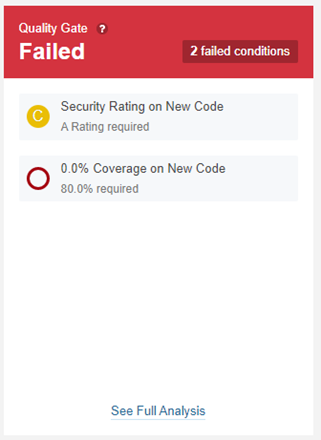
Figure 1: Summary Quality Gate Report in Sonar Cloud
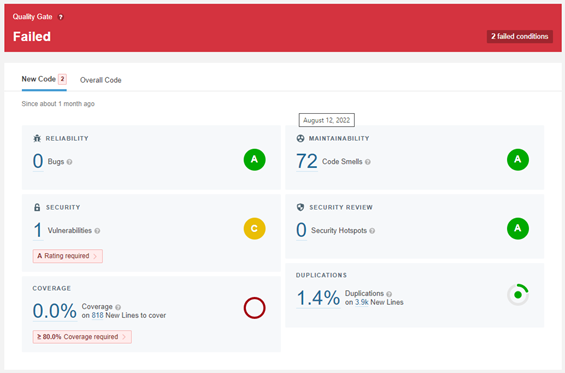
Figure 2: Detailed Quality Gate Report in Sonar Cloud
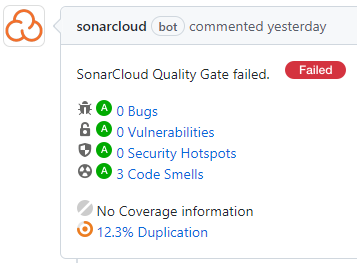
Figure 3: Sonar Cloud bot comment in GitHub (from a different repo)
Code rules
We are currently working with the default code rules for all languages.
It analyses the code (C#, PHP, TypeScript, JavaScript), the mark-up (HTML) and the styling (CSS, SCSS, SASS). It is strict on compliance with accessibility requirements.
Code which belongs to third-party libraries has been excluded from analysis (or it should have been). This prevents code warnings on these; however, it is important that they are kept up to date to avoid vulnerabilities being introduced by third-party components. If new libraries are added, which are not excluded, then you can request for them to be excluded.
As a static code tool, it will sometimes flag things which need to be manually checked to be sure they do not introduce a bug or vulnerability. Please ensure you add comments if you mark any of these as not a bug/vulnerability.
If there are code rules causing bugs, vulnerabilities, or code smells that you disagree with then please post into the Dev channel to suggest amending the rule (making it a lower priority, for example) or to disable the rule.
Code smells
Most of our projects have lots of code smells, the larger the project the more code smells. However, the vast majority of these will be rated as minor – often simple things like code formatting.
Visual Studio and Visual Studio Code can apply the stylings automatically, through keyboard commands – Ctrl+K,Ctrl+F in VS, Shift+Alt+F in VS Code. Both support styling files to align the rules, as necessary.
If a project has code smells rated as ‘Blocker’ or ‘Critical’ then these should be added to the backlog to be addressed as soon as possible, and new code should not be merged if it contains these.
For all other ratings, these should be addressed before making changes to the file concerned. Eventually, following these will improve the readability and therefore the maintainability of the code, but we will only fix them as we work on the files concerned. When applying these changes, they should form a separate commit/PR before any functional changes are made to the file(s) concerned.
IDE code assistance
SonarLint is available for various IDEs including Visual Studio and Visual Studio Code.
This provides analysis within the IDE of problems with the code. When used in “connected” mode, it links to the SonarCloud analysis of a library.